Showing posts with label agriculture. Show all posts

2011-10-07

Balcony Crop 2011

Winter is coming and I almost forgot...
This year crops were not better than last year, and considerably less than the first year, the ground in the vases is getting "worn out" and too compact so vegetables that grow in the ground (carrots and turnips) don't grow that much.


Still we managed one (yes, only one) bowl of steamed vegetables (150g). This year Luísa helped picking up the carrots.
The "top of the crop" goes to the turnip followed by the micro-carrot.


Unfortunately, the beetroot did not survive the very dry and hot spring followed by a damp and lousy summer...
I'm now awaiting for everything in the vases to dye out and then I reinforce the soil or change it all together...

2011-04-09

New Crops 2011

Spring is up, time for some new balcony crops! This year, broccoli, turnips and carrots.. They're already sprouting (due to the fantastic weather we've been having in The Hague...
These are my carrots for this year (the clay ball is 1cm diameter).

Just noticed that I need to clean the lens, probably the "little camera devil" touched it...
This is a beetroot that survived the winter.

Hopefully it will grow to "edible" size in these next few months.

2011-02-05

Chillies in the Wok

Finally it was time to eat my first chilli of the year! I let my jalapeno/piri-piri hybrid ripe until it was almost all red and then... to the pan with it.


It was not very big nor powerful, but a decent chilli!


Sliced and Wok with it...


Here's the dish next to the little Chilies vase...
Shrimps, Chillies, Peas and Udon noodles in the Wok are always a winning combination... Om nom nom!

2010-09-03

2010 "balcony carrots" grand cru

For those of you that just arrived, this blog has nothing to do with wine... today I'm talking about carrots. This year's crop of carrots from the balcony vases was about 200g, slightly less than last year's (300g), but I planted other stuff (some worked out, some didn't). Crops were delayed (about 1 month) this year due to the harsh winter. We also had a new arrival, little Luísa! She loved the carrots as finger-food... extra tasty!

She is now 9 months and moving around, she takes much interest in my books...

But most of the time she's a sweet baby...

2010-02-27

SolarLight (7) - Software, AVR assembly


Ok, finally google docs supports any type of file so I can post all the project files in one place: code, gerbers, gEDA design files and spreadsheet with the calculations, requirements. It is all here.
I decided to try out pastebin, so I'm updating this post with the code for everyone to take a peek... In this version I'm still working on the "when to turn on" routine, I think it still doesn't work as I initially intended... pastbin doesn't look so good to paste long assembly lines, but here it goes anyway..

The software as it is now is working, it has some problems and "room for improvement" but it is working! You know the motto: Make it work, make it better!, make it faster!

One of the improvements would be to limit the time the light is ON to about 30min-45minutes, this would allow the battery charge to progressively increase during the good sunlight days and progressively decrease on a sequence of bad sunlight days (as in this year for example).
Other improvement could be a full darkness detection and adjust a 12h no light clock from there. It has happened that during the day when a big cloud (and/or heavy rain/heavy snow) the measured light level goes down to the "night" level, then if there's enough battery the light turns on... it shouldn't and I'm sure this winter is exceptional, but the only way to prevent this is to detect the lowest darkness point and count 12 hours from there, and only from then on the light would turn on when it is dark.

In the code I added a debug routine that is included when the two variables are uncommented (DEBUG and DB_CNT), when I wanted to output a value I load it in the DEBUG variable and call dbug. The byte is output in the status LED serially MSB first, there is a long (2 cycles) high pulse followed by clock and MSB data, clock and bit 6 data... clock and LSB data.

Finally my biggest problem was the branch instructions, the AVR has the following:
BRLO - Branch if Lower (UNSIGNED)
BRLT - Branch if Less than (SIGNED)
BRGE - Branch if Greater or Equal (SIGNED)
BRSH - Branch if Same or Higher (UNSIGNED)
I was not used to have these complex branch instructions, I'm used to Zero Flag set, Zero Flag Clear, Carry set, Carry clear... I'm specially not used to having a different branch for signed or unsigned... So I chose wrong.. result the jumps were not taken when they should. The ADC values are unsigned when read (0..255) but if you start calculating with them you can get signed (negative) values and then you have to use signed instructions.
AVR assembly programmer beware!

A final word about the Code, it was assembled with Atmel AVR Studio Assembler (Win), it doesn't output the number of cycles per instruction... a bit of a let down... :-)
And with this post I finish this project.... Woo Hoo!! Project is dead, long live the new Project...

SolarLight (6) - PCB Fabrication and Assembly

Using gEDA for producing gerbers turned out to be easier than I thought.
Recently the gEDA project has been under fire in slashdot due to its "complicated", "non intuitive interface" and lack of documentation. I really don't think that the documentation is that bad, it is scattered but it is not bad, just look here. I haven't meet an Open Source project that didn't suffer from the same problem, even (and particularly) the GNU tools. As soon as you get out of the mainstream gcc/gas/ld/gdb you're almost on your own, searching bits and pieces in the internet. Some of the best GNU project documents have been written by a commercial enterprise (either redhat, cygnus or other).
I call it Anarchic-Knowledge (or Anarco-Conhecimento in Portuguese), everyone omits to write what he finds trivial, forgetting that what is trivial to him, might not be for the community that will use the product. Then a plurality of tutorials, blog posts and guides show up, each one showing how they did it "their way". A new user has to pick all these pieces, try more than one and finally write a "I did it my way" post... And we all learn from this experience.It is not the lack of documentation, it is just the way that Open Source grows.
Back to the how I did it... :-)
I followed this tutorial, I had a single page schematic so it was easy to generate the netlist. I created a single project file with the schematic libraries, I used my own symbols since not only I wanted to learn how to do them but also I had a MOSFET with two Drain Pins that I could use each in an independent circuit. I used shell scripts to get the job done, I tried once a Makefile but I realized that I would have to change the Makefile for every project (even smaller ones), a shell script can do that at invocation time.
I also created some Footprints for my project (also for educational purposes), I had them in a library directory and used jcl's gnetlist invocation but with my directory instead. PCB must also be configured to have a pointer to your library in the "File-Preferences-Library".
First follow what gschem2pcb tells you to do, open the file, import the parts, spread them and execute the command, then I put in most of the mechanical details, using the outline layer in a place where no components were place, size of the board, cuts, groves and fixing holes. Also check now for the DRC tolerances in the File-Preferences Menu.
Then the fun begins, it is a very iterative process: place, route, looks good? can I do it better? with less vias? other mechanical problems? heat sinks/problems? repeat until satisfied with the design.
Then I place some more information on the silkscreen, plus signs on the connectors, output indication, board reference, moved the references so that all are visible when the components are soldered and facing the same side (so that you don't need to rotate the board to read the references). I also place on the top and bottom layer a square with the layer number inside, so that you can identify the layers on the gerbers and on the boards.
I was going to use Olimex pcb prototype services for my first gEDA boards so I needed to limit the number of drill sizes, they have some drill sizes that are considered standard and any other is considered extra (and you pay more), luckily someone from the gEDA-user group already made a drill mapping file for Olimex after executing the script run DRC again! Here's my final PCB result.
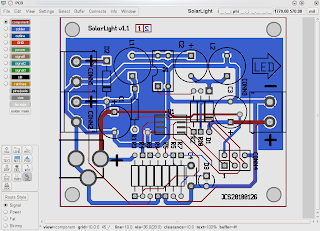
You can also export to png the two sides of the board in a "photo-like" picture, some people claim it gives better reading and it is easier to spot errors.

If you have no errors in the last DRC you're ready to produce your gerbers, and this part is as easy as pressing the correct button in export. Then with gerbv, check if the gerbers look nice and the drill sizes are correct.
Recently a good question came up in the geda-user mailing list, it sums it up nicely but the first reply reminded me of something I didn't do and should have done...
Print out your surface copper layers and put the parts on the printout to make sure they match.

yup, I designed my resistors with a 1/8W in mind and then I couldn't find any I had to use 1/4W.. so the resistors didn't fit in place. My DIP 4 for the MOSFET also didn't had big enough holes, apparently International Rectifier didn't stick to the normal DIP drill sizes, probably due to current capability or thermal conductivity. In that point, with some hindsight, I would increase the copper area connected to the drain, that could be a good heat sink for the MOSFET. I also should have thought a bit more on how to fix the board to the pole, with the new batteries the SolarLight is much heavier, I should have devised other way to fix it. Here's the board in place, note the resistors in two layers.
UPDATE: The resistor that is hanging and has two sockets is the gate resistor of the MOSFET, if you check the spreadsheet with the calculations you can see that the gate current has great influence in the MOSFET power (losses), so I made it low enough to still allow programming easily (now at 100R). When programming the micro the light turns on, but without any damaging effect as long as the frequency (of programming is high enough 250k) and the pattern is sufficiently random (see here for a bigger problem with ISP port sharing).


One last remark, if you buy microcontrollers in ebay and they say "New, Old Stock" it doesn't mean that they are not programmed, they can be factory programmed and that doesn't mean that they are not new! In case of the ATTiny15L, the low voltage programming mode can be disabled by this factory programming, if you solder it to the board you'll not be able to reprogram it. You need to remove it from the board and use a HVProgrammer like AVRDragon for example. Learned the hard way...

2010-02-17

SolarLight (5) - PCBs!!!

I finally had the time to pick my PCBs at the mail. I was thrilled to see who it went... My first linux made PCBs!
Everything went ok, except for a few minor point where I'm the only one to blame...
Here are the pics to the solarlight board and the others, the last one is the RFadaptor that didn't go as well as I expected, but I'm the only one to blame....
Here is the one where the wholes are just the size of the pins (just not enough for them to get through)...

I'll post how to get from PCB design to send them to Olimex (for example) for production. It's not that difficult but you need to follow some steps.

2010-01-30

SolarLight (4) - gEDA, PCB and first corrections

It has been a while since my last post, but I've been busy... not so much on electronics projects, but projects of other kind... Nevertheless I've been working a bit on SolarLight.
The prototype was working to light the LED but some other bits of the code were not working. Although the "light-on" function was working, the function checking the battery and checking the charging were not.
After wake-up from reset (power-up or watchdog), the micro checks if the current Solar Panel voltage is >200mV than the battery (a safe assumption it is charging) and if so increments a "charging timer", if this timer is less than 3hours, don't turn the light on. This is to be sure that there is some charging before a discharge. These and other checks were not working.
De-evolution from C to Assembler is always a mess if you have to re-learn the mechanics of each architecture. It is not only the instructions, its how the micro "thinks", only then you really control the machine.
On the hardware side I also had some problems, due to the limited number of pins I had to share some pins with the in circuit programmer, one of them is the MOSFET gate. I forgot to add a gate resistor to the source, in common MOSFETs with 10V gate threshold that is still asking for trouble, I guess that with LL (logic level) gate thresholds of 2V it is just "waiting to happen"... although it did take a couple of weeks...
I guess what hapened was, after programming the AVR-ISP left the pin floating and probably before that the level was high... the MOSFET kept on and finally burned.. I saw smoke coming out...
Here the new schematic with revisions on the lower corner.I also started the PCB design (with PCB part of gEDA suite) and I've now finished the board. It is not as packed as it could be because it has the size of a 3xAA pack. It is marked version 1.1 because I had finished the version 1.0 when the MOSFET blew up. I've mostly followed the tutorials available at the gEDA Documentation site:
- this one for the drawing of schematic and creating the netlist;
- this one for drawing footprints and getting to know PCB;
- and this one for the simulation;
- I also used this one for creating large "box symbols" (cpu, uart, etc)
I used gschem directly to create the new MOSFET symbol (IRLD024), since the original MOSFET symbol was graphic I though it would be better to use it instead of having a 4 pin box. I also wanted to keep both Drain connections separated if needed to use them in separate nets (although they are connected).
Using gEDA is still far from trivial as components, footprints, schematics symbols are all your responsibility, but still, I'm starting to like it. PCB also has a nice feature, you can print "photo mode" version of your PCB (yes, I know other software produces 3D views), here's mine top side.

2009-12-19

SolarLight (3) - First Prototype


Well after the initial breadboard, I decided to do some extra work on the Solarlight. I built a perfboard/smd board prototype and as usual I had to do some "adjustments".
Since my ATTiny45U in DIP are "precious" I wanted to use instead one of my ATTiny15L that I had around (a previous buy in ebay).

There are some major differences between the Tiny45 and the Tiny15L:
- Software - the Tiny15L does not have RAM and has a fixed length stack (3), programming it using avr-gcc is difficult and involves "tweaking" the code (see more here). The Tiny15L also does not have the debugwire interface, so debugging is a bit more difficult. Therefore I decided to develop the code in AVRStudio in windows (bah!) in assembler, as much as I like linux the simulators available are still far from perfect. One final remark on the simulator in AVRStudio, always read the notes about your processor, in the case of the ATTiny15L the watchdog is not simulated and the noise reduction sleep/wake-up on ADC conversion complete is not simulated!!
- Hardware - the pins and ADC input PB3/PB4 are switched (mentioned here), the ADC converter internal reference is fixed to 2.56V (ATTiny45U has 2.56V and 1.1V), the ATTiny45U has more power saving options and the frequency of the maximum PLL frequency (important for a high speed converter) is higher on the Tiny45 (8x8MHz=64MHz) than on the Tiny15 (16x1.6MHz=25.6MHz), the CPU clock also higher on the Tiny45 (8MHz) against the Tiny15 (16MHz).

The light is working but there are still some software issues to solve. As I mentioned the ATtiny15L does not have the debugwire interface, in order to debug the project I decided to encode data in the status LED as a bit-banged serial port (like this one), when I want to see a value of a conversion or get a check point or value, I change the code and wait for it to show up on the scope.
I also decided that I had to have a way of forcing a full light mode and a half light mode (both independent of the battery and charging) in case I connected the light using an adaptor (no solar light mode). For this I thought of using this same status pin, curiously this pin is placed between VCC and GND in the programming connector, so a simple jumper could activate these modes in the final product.

2009-11-27

SolarLight (2) and gEDA simulation

An update over SolarLight, I finally managed to print waveforms from ngspice in OpenSuse 11.2 . For some reason the interface is not what you would expect and it has become much more complicated to print a waveform than before.
The first time I installed gEDA from the sources (under OpenSuse 10.3), now I'm using a precompiled version from the OpenSuse Science repository, it could be that the precompiled version has the printer interface "disabled" in some way.
Back to waveform printing, under ngspice one would follow the following path to simulate and plot a waveform:
tran 100n 1.5m
plot v(501),v1000#branch

In the case of the SEPIC circuit of a previous post this would run transient simulation until t=1.5ms with a minimum time step of 100ns (try not to have more than a few thousand simulation points), the second line would open a new window with the output voltage and LED current displayed.
Previously when I pressed in the hardcopy button the print interface would appear and I could chose the printer and/or print to file. Now a message appears in the console:
The file "/tmp/hc4803" may be printed with the Unix "plot" command,or by using the '-g' flag to the Unix lpr command.

If you try the "lpr -g" command either the system complains that it is not supported or that no printer is installed.
lpr: Warning - 'g' format modifier not supported - output may not be correct!
lpr: Error - no default destination available.

After installing plotutils I managed to convert the plotted file (hc4803) to almost any known format (for example postscript or png) with the command:
plot --output-format ps hc4803 > hc4803.ps
plot --output-format png hc4803 > hc4803.png

This allows the plots to be printed and included in documents or webpages, the plot looks something like this:

Then I wanted to try out gwave, gwave is a waveform viewer, part of the gEDA package but its use is far from trivial. First in gwave you must run a simulation and then write the data to a file:

tran 100ns 1.5ms
write plotdata.dta

then run gwave with this data.

gwave plotdata.dta

The interface is far from trivial, I was unable to use colours for the plot and I also had error while trying to print a plot, but at least I could see some waveforms. Results may vary depending on your installed system, but here is a screenshot of the program, the waveforms are in gray on black background:


I'm now temped in building the gEDA toolsuite from scratch... but for that I need some more time...

2009-11-22

SolarLight

Some time ago I had the idea of building a LED lamp that was solar powered, harvesting the Sun during the day and charging the battery, while at night deliver some light. The idea was to extend the hours of light of my peppers during the winter, once the vase was inside the house.

For the initial design I wanted to use two old Ni-Cd batteries and for this supply voltage I would need to use a low voltage oscillator circuit as the minimum voltage would be around 2.0V. The converter would be a boost converter since the Luxeon K2 I had were rated for minimum 2.79V. I started by using a general Boost converter design procedure, and then simulate the circuit in gEDA/SPICE/ngspice.


I stumbled in two problems:
- after some tries with simple transistor oscillator circuits, low voltage comparators, and PWM modulators I decided to use a micro-controller. The biggest problem was the low voltage, even the low voltage circuits shut-down at 3.0V. Then I decided to use a low-voltage micro like the ATTiny45U capable of operating from 1.8V.
-The booster wasn't working, the LED was conducting slightly when the oscillator was off, a known problem with boosters, if the load consumes power at the input voltage minus a diode drop the circuit is always draining the battery.

Finally I decided to redesign the circuit using a 3 element battery, this time a scrap battery from a mobilephone Li-Mh with 3.7V, this would ease the micro selection (Attiny15L that I used before) and I had to change the type of converter to a SEPIC, that allows the use of a battery with a voltage close to the LED conduction voltage. The circuit has the advantage of being capable of boosting or dropping the input voltage, this application note and this one are quite useful for the design phase. Since the load is an LED I allowed a bigger fluctuation in the inductor currents and of the output current, then I chose the operating frequency function of inductors I had available.

Again, after calculating the circuit components I drew a circuit in gEDA and simulated the circuit. As a general design procedure the circuit I use to simulate is very different from the one that I'll build in the breadboard/PCB.

I placed some components inside green boxes to simulate real inductors with series resistance and real capacitors with series resistance. The voltage sources with zero voltage in some branches allow measurement of the current in the branch. I could not find the correct MOSFET (IRLD024) model, instead I used the model (IRFD024) of a similar one but with a different Gate Threshold Voltage. Also as a common procedure to minimize size of the files and speed up processing, I create a smaller library file, containing only the models used. I wanted to show a waveform but since I updated my OpenSuse install to 11.2 I'm unable to print ngspice plots...

After verifying that the circuit worked, I designed the final schematic with the micro-controller and the voltage dividers of the various analog inputs.


The software was straight forward, start the high speed oscillator, start the PWM generator, read voltages, take decisions and increase/decrease PWM output. One note worth mentioning is that the ATTiny85 and the ATTiny15 have two input ports exchanged (Port PB4/PB3 - Pins 2/3) although the ADC inputs are the same!
Here is a couple of pictures of the circuit, the first charging and the second working.


2009-09-27

Peppers update

My chilly crop has had its ups and downs. Some time ago the leaves of most stems where becoming yellowish and falling, latter the cause was known to be over-watering of the plants. Since reducing the water to once every three/four days (from once every day) the leaves started growing again and of a vivid green color.

When the temperatures are forecast to reach below 5 degrees centigrade during the night I bring the vase inside, otherwise most of the time the vase is outside facing southwest/west.

Nevertheless, our strange looking pepper is only now becoming reddish, it is supposed to be a Jalapeño, but it is curlier than most peppers I've ever seen. Most people don't know but before peppers become red and ripe, they go through a stage where they are mostly brown/black. Since the strange pepper is a bit bigger than most the color transition takes more time and you can see the color grading from green to red going through brown.

The leaves of this particular pepper are still yellowish, but at least they're not falling... I hope it recovers soon and reaches maturity A.S.A.P.

Meanwhile a new flower has open... so probably more peppers are expected for Christmas...

2009-08-03

Harvesting the Carrots

Last Weekend we decided to Harvest my carrots from the vase. When we came back from a week away we noticed that they were not growing that much. We thought that they must have reached their limit in the vase so...it was harvest time... and we were in for some surprises...

The first one out of the vase was "Quasimodo", because we transplanted the carrots some of them had grown into strange forms. Lesson learned.... do not transplant carrots...

This one we really don't know what to call it... or... we do but it's not nice...they are actually two carrots that started in the same yogurt cup and ended up knotted together.Here's a picture of the whole crop, not bad for a single vase. Last but not the least:
This is the way the world ends,
this is the way the world ends,
not with a bang but with a chicken stew (at least for our carrots).

2009-07-07

Summer Solstice

According to Wikipedia this year's solstice was on the 21st of June and it was the "official" begin of the summer. My peppers finally blossomed and I was waiting to get more peppers and earlier than last year. I still hand pollinate them as on this high floors bees or the like are very scarce, on the other hand, Ana's tomatoes just need some wind...


We were having some bugs attacking our crops, specially the parsley, celeriac and the peppers. I took a picture of them and then tried to find something similar on the web. I was also looking for advice on how to biologically get rid of it, since we actually intend to eat our products we didn't want to used any harsh chemicals. The appeared to be an Aphid, but I was not sure it looked more like this one. Here's a picture of a celeriac leaf with the pest.

As with all my plants problems I called mum and dad, experienced "farmers and plant growers", for a cure.... And they delivered, mix the ash of a full ashtray with water, mix it well, filter it through a cloth, put it in the sprayer and "splash them all".
As we are not smokers, I asked Tiago to collect his cigarette ash.. He definitely is not smoking that much (which is very good for him!), this was what he collected in two weeks.


I mixed it with water, filtered it through the cloth, then place it in the sprayer and off I went... A lean, mean, bug killing machine.

Two weeks after, the plant is alive (although the leaf in question has almost dried) and the bugs are gone!
Just great! Many thanks to Tiago, "without whom none of this would be possible" (sort off :-).

Meanwhile my carrots are also growing steadily, some of the tops are popping out... can't wait to get them out... but I need to leave them by one more month...

2009-05-24

Follow up on Balcony garden

Our vegetables have been growing steadily for the past two weeks. I've been moving some of the sprouts that were born in the yogurt cups to the bigger vases, but now I don't have any more space. On some, instead of removing them from the cup, I just cut the cup bottom and push them into the vase.

I learned that carrots don't like and should not be moved! No wonder now that they took so long to adapt, on the other hand tomatoes, kale and the celeriac don't seem to bother being moved and are developing nicely.
On the "battle of the veggies" I seem to be up front in the kale, celeriac and carrots, unfortunately my tomatoes look like little dwarfs compared to Ana's..

Last week my kale reached some "maturity" and before it became too hot to eat a soup we decided to try doing a caldo-verde.

We used some of the bigger leaves of our kale to do it, with some "chouriço" and bread, hum ... delicious...

2009-03-16

Time Lapse Agriculture

I always thought the one of the great pleasures of being a farmer was to "see plants grow". Maybe I'm too impatient, but after looking at them for 15 minutes and see nothing I decided to try and do a time lapse video.
Ana tried her film first, she used a regular camera and took pictures every 15 minutes for two days (most of it). Later I ordered the pictures, reduced the size and composed the video. In order to keep the same illumination during the day, she used an halogen lamp over the plants. Naturally it is quite clear that this fakes the results and her plants grow super fast...
I decided to use a computer and a webcam to do the job for me. First I tried a logitech quickcam messenger but the resolution was very coarse, it needs special drivers in linux and it does not auto adjust for the brightness.
Next, Tiago borrowed me a Philips Webcam PCVC830K, it worked out of the box in Suse 10.3, resolution is 640x480 and adjusts for the brightness.
I created two scripts, one to take the pictures every 6 minutes and another to compose the video.
Here is the snapshot script:
#!/bin/bash
## adapted from http://mydebian.blogdns.org/?p=261#more-261
## Takes a picture every (wait) seconds and renames it ${now}

# how long to wait between each download
wait=360

## main endless loop ##
while true
do
now=$(/bin/date '+%Y%m%d%H%M%S')

## fetch new webcam shot ##

ffmpeg -s vga -r 1 -t 1 -f video4linux -i /dev/video0 -y plant.jpg
mv plant.jpg "${now}.jpg"
## echo "${now:8:2}" just the hour
echo "${now}"
/bin/sleep $wait

done
Here is the script to compose the video:

#!/bin/bash
mencoder -ovc copy -mf w=640:h=480:fps=15:type=jpg 'mf://*.jpg' -o time.avi
During the shoot I hit the box with the vacuum cleaner, so there's a small shift... be warned. The shoot takes place from Friday night to Monday morning. The plant box is facing south and is close to the TV, so during the night there's a first level of darkness, then when we turn off the TV the only light is the webcam red led. The red led allows us to see some, although little movement.
Here is the video...

2009-03-05

New crops!

Time has arrived to start growing some more vegetables! Sowing should be done outside when you're certain that will be no more frost. Since in Holland you never know... we decided to start growing inside. Me and Ana also decided to "make a competition" to see who would have the best crop! Last Sunday we started, each of us would have a small wooden box with some yogurt plastic cups, we would sow the same seeds, each responsible for his box.. It is easy to see which one is mine (yes, the dirty one).

I placed yellow tags in each cup to know what was inside each of the yogurt cups, the names are in Portuguese, beware. The seeds are Tomato, Parsley, Celeriac, Rucola, Portuguese Cabbage and Araça.


By Tuesday my rucola was already germinating, Wednesday the cabbage was sprouting, today both are steadily growing.